Overview : R800ZZ WebXR PMX+VRM ViewerEnglish
Русский
Español
ภาษาไทย
中文
한국어
日本語
vr180g.com
Update 12 AUG 2026
Free VR Web apps
R800ZZ WebXR PMX+VRM Viewer
3D avatar viewer, 3DCG video creator, VRM→ PMX converter
- Developer : R800ZZ
- Supported devices (XR/VR) : VR HMD(PICO 4 Ultra+PICO Browser,PICO 4+PICO Brower,Meta Quest 3+Meta Browser,PC+SteamVR+Edge/Chrome/Chromium)
- System environment (WebGL) : Web browser , CPU integrated GPU supported. (Example: Intel UHD Graphics 630)
- Video file creation requirements : Requiere Chrome/Edge/Chromium en un sistema operativo de escritorio. Firefox no es compatible, los sistemas operativos móviles no son compatibles.
ffmpeg required.
- Price : Free
- Supported Avatar : PMX(.pmx Avatar / stage),PMD(.pmd),BPMX(.bpmx)
VRM 0.x(.vrm),VRM 1.0(.vrm)
PMX file does not contain texture images.
Web browsers have limitations in how multiple files can be selected.
three choices
1.Select the folder.(Desktop OS only.)
2.Combine PMX and texture images into a ZIP file.
3.Combine PMX and textures into a BPMX file.
PMX to BPMX Converter(conversion=Desktop OS only.)
Closely related sister software (by the same author) : R800ZZ WebXR VRM Viewer
- Supported Animation : VMD (*.vmd Avatar / camera)
- stage(.pmx)
- camera(.vmd)
- .mp3 , .wav
- 360° panoramic image (background)
- Standard image (background)
- Supported languages : English, Russian, Spanish, Thai, Chinese, Korean, Japanese
- he operation of the left controller and the right controller is the same. ?
"AR" : Passthrough in VR (Wolvik Not supported )
"VR" : VR
Grip Button: Grip+Move(Up and down/Left and right)(Grip move) : Player Move
Thumbstick Key+Up and down/Left and right : Rotate
- 6DoF : You can freely move in the VR space.
- Built-in animation : by R800ZZ , These were motion-captured using the PICO Motion Tracker.
Software : R800ZZ Motion Capture
- Simple Physics Settings
VRM → PMX conversion feature
Check the checkbox "VRM to PMX converter" and when you load a VRM file a PMX file will be produced.
This software performs conversions locally.
This software does not send files to external servers.
You can check the quality of the converted PMX avatar immediately after loading a VRM file, including facial expressions, physics, and motions.
I have worked to support loading as many VRM files as possible.
Known issue: elbows in VRM 1.0.
・VRM 1.0 conversion error (fixed)
・VRoid glasses not becoming transparent (fixed)
・Color differences on certain models (fixed)
・Other conversion errors (discovered errors have been fixed).
VR180 SBS (2 Cameras / 12 Cameras) : Video file creation
ffmpeg required.
Automatically generate .bat file with cmd.exe
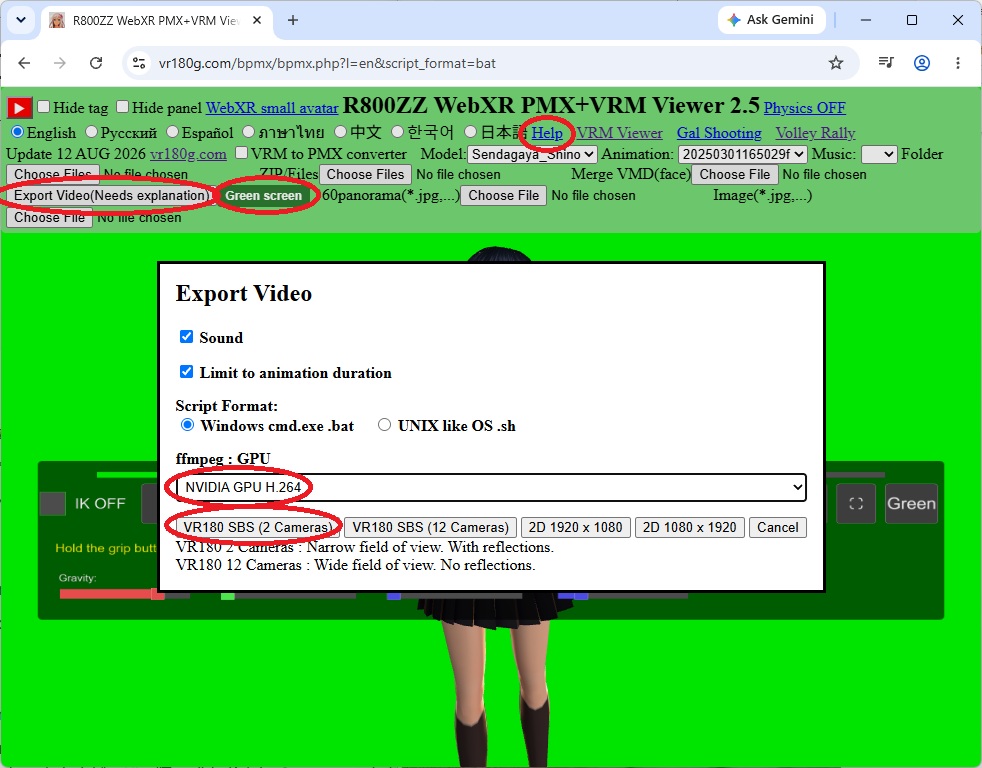
2D : Video file creation
For concatenating sequential image files, ffmpeg or an alternative software is required.
Automatically generate .bat file with cmd.exe
H.264(-c:v libx264)ffmpeg -framerate 30 -i frame_%05d.jpg -c:v libx264 -pix_fmt yuv420p output.mp4
NVIDIA GPU + H.265(-c:v hevc_nvenc)ffmpeg -framerate 30 -i frame_%05d.jpg -c:v hevc_nvenc -pix_fmt yuv420p output.mp4
Concatenate sequential image files to create an MP4 video file.
In batch file (.bat) scripts, "%" must be replaced with "%%".
H.264(-c:v libx264)ffmpeg -framerate 30 -i frame_%05d.jpg -i input.mp3 -c:v libx264 -pix_fmt yuv420p output.mp4
NVIDIA GPU + H.265(-c:v hevc_nvenc)ffmpeg -framerate 30 -i frame_%05d.jpg -i input.mp3 -c:v hevc_nvenc -pix_fmt yuv420p output.mp4
Concatenate sequential image files + add an audio file.
In batch file (.bat) scripts, "%" must be replaced with "%%".
Tips ffmpeg
R800ZZ WebXR VRM Viewer
WebXR Unity,Ayame no meaning
Software:
babylon.js,
babylon-mmd, PHP
vr180g.com